

How it works
Getting Started
The first step is to establish an account with Tempest Telecom. You may signup for an account here. You will need a WiFi card to connect to the Hotspots. Most newer laptops come with WiFi built-in. If your laptop doesn't, almost any off the shelf WiFi card that supports 802.11 will work.
Finding a Hotspot
 Search
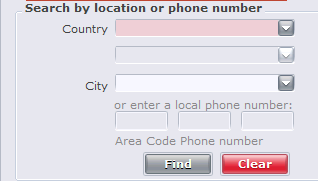
- To find a hotspot all you need to do is open up the dialer and
select a location. The interface has an easy to use search function
that allows you to narrow your locations down to the country and the
city where you wish to connect.
Search
- To find a hotspot all you need to do is open up the dialer and
select a location. The interface has an easy to use search function
that allows you to narrow your locations down to the country and the
city where you wish to connect.
 Select
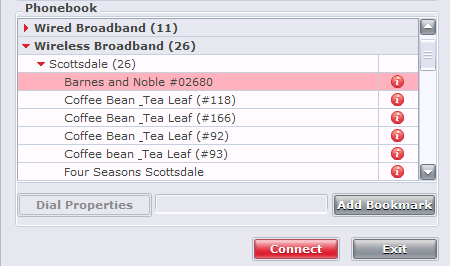
- Under the location, you will find a list of hotspots and a brief
description of the location. .
Select
- Under the location, you will find a list of hotspots and a brief
description of the location. .
Connecting
To connect open the dialer, select the location and press connect.
Payment
Cost of the service is between $9.95 and $19.95 per day (24 Hours) based on your Zone starting from your first login. You may travel to different hotspots and connect multiple times with in that 24 hour period without incurring additional charges. You will be billed for all usage at the end of the month.